Debugger
Debugger is a debugging tool for Originator Profile. It allows you to test Content Attestation Set (CAS) and Site Profile (SP) and check for errors during verification.
How to use Debugger
Screen description
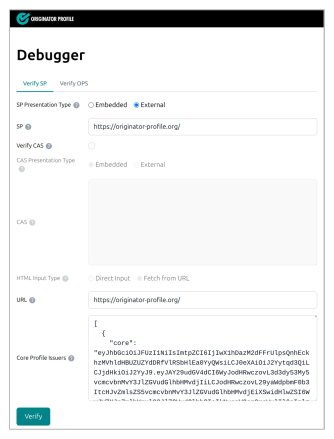
Input field
| Field | Description | Display conditions |
|---|---|---|
| Core Profile Issuers | OPS (JSON) is the starting point of the trust chain. | Always displayed (required) |
| URL | Website URL to be verified | Always displayed |
| SP | Site Profile data | Verify SP tab |
| OPS | OriginatorProfileSet data | Verify OPS tab |
| Verify CAS | Check box to enable CAS verification | Always displayed |
| CAS | Content Attestation data | When CAS verification is ON |
| HTML | HTML content to be verified | When CAS verification is ON |
- Select the verification mode from Verify SP / Verify OPS.
- Enter the URL of the website you want to verify in the URL field.
- Turn on Verify CAS as needed and enter the data.
- Click the Verify button to perform the verification.
- The results of each step will be displayed sequentially. In case of failure, you can check the error type and cause.
Parameter format
For each of the SP, OPS, and CAS fields, you can select the data presentation format (Presentation Type).
- Embedded: Enter JSON directly.
- External: You can retrieve data by specifying an external URL. If you select "External," the data will be retrieved via a server-side proxy.
In HTML field, you can select the input method (HTML Input Type).
- Direct Input: Enter the HTML directly.
- Fetch from URL: This retrieves HTML from the URL specified in the URL field.
Core Profile Issuers
The public key that serves as the starting point of the trust chain is decoded and verified. This step is always performed. If it fails, the process is aborted.
Site Profile Verification (When Verify Site Profile is ON)
Follow the Site Profile Verification Process to verify the SP's signature and the Originator Profile's integration.
- Fetch or parse SP data.
- Get the URL origin.
- Merge SP originators into Core Profile Issuers OPS and run
SpVerifier.
OPS Verification (when Verify Site Profile is OFF)
This directly verifies the signature of the Originator Profile Set (OPS) without using a Site Profile.
- Fetch or parse OPS data.
- Merge the Core Profile Issuers OPS and the target OPS, and run
OpsVerifier.
CAS verification (when Verify CAS is ON)
The content integrity will be verified according to the Content Attestation verification process.
- Get or parse the HTML and then parse it with
DOMParser. - Fetch or parse CAS data.
- Content Attestation is verified using
verifyCas().
Sharing form state via URL
Form input values are saved as Base64url-encoded JSON in the URL hash fragment. This allows verification settings to be reproduced when bookmarking or sharing links.
Verification flow
Debugger performs verification in the following order. Site Profile verification and CAS verification can be enabled optionally.