Content Attestation Server Playground
Content Attestation Server Playground is an environment where you can test the workflow from publishing content attestation to verifying it with OP Inspector.
Playground is a testing environment only. Content Attestations and Site Profiles published in Playground cannot be used in a production environment.
A command-line tool, OPVC CLI, is also available for trying the issuance of CP, PA, WMP, and other profiles in addition to issuing them in the Playground.
For more information, see the OPVC CLI documentation.
How to use Playground
Screen description
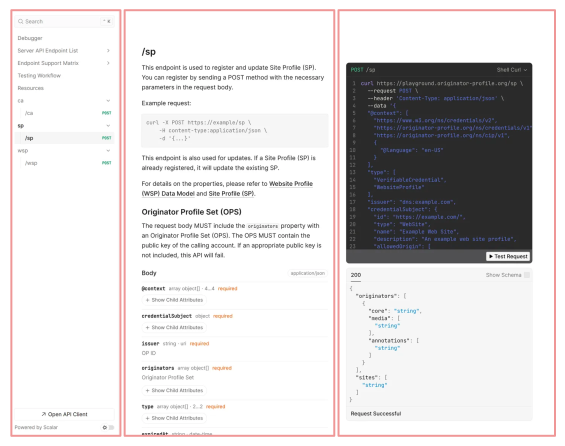
The screen is composed of three panes (columns): "left," "center," and "right."
- Left pane: Navigation (Sidebar): This is an index of API endpoints. You can search for and select the endpoint you want.
- Center pane: Document: The center pane displays detailed specifications for the API selected in the left pane. It includes the endpoint URL, a function summary, required and optional parameters (Query, Path, Headers), and the request body data structure (Schema).
- Right pane: API Client: This is a test environment that allows you to execute API requests directly within the documentation. Implementation code snippets are automatically generated for various programming languages (Node.js, Python, etc.) and command-line tools (cURL), which you can copy and use in your development.
The following is how to verify that the API is working correctly.
- Select an API: Use the search bar at the top of the screen, or select the API endpoint you want to check from the navigation in the left pane.
- Enter the parameters: You can check the specifications in the central pane, then click the "Test Request" button in the right pane (or at the bottom of the central pane) and enter the necessary parameters. You can enter the data in the required JSON format in the request body.
- Send a request: Click the "Send" button to send an API request to the target server.
- Check the response:
After submitting the request, the response status code (e.g.,
200 OK) and the data returned from the server (in JSON format, etc.) will be displayed on the screen. You can then verify whether you have obtained the expected results.
Issue a Site Profile
A POST request is sent to the Playground endpoint /sp.
curl -X POST https://playground.originator-profile.org/sp \
  -H content-Type:application/json \
  -u BasicAuthenticationUsername:BasicAuthenticationPassword \
  -d '{ ... }'
For details on each property in the request body, please refer to the Website Profile (WSP) Data Model and Site Profile (SP).
Verification method
You can perform verification by accessing the website where Site Profile is deployed, with OP Inspector installed.
A test build of OP Inspector is required for verification.
The test build version of OP Inspector is for the Playground environment only. It cannot verify content attestations in the production environment. Also, content attestations and site profiles published in Playground cannot be verified with the standard build version of OP Inspector.
You can download and install OP Inspector (test build) from GitHub Releases (canary).
| Browser | File name |
|---|---|
| Chrome | _testing_op_inspector-chromium-canary.zip |
| Firefox | _testing_op_inspector-firefox-desktop-canary.zip |
How to automatically issue a CA using the WordPress plugin (CA Manager)
If you are using WordPress, you can test the automatic issuance of a CA using the WordPress plugin (CA Manager). After completing the "1. Plugin Installation" section of the WordPress Plugin (CA Manager) Guide, please configure the settings by following the steps below.
- Issue a Site Profile in the Playground For instructions on how to issue a Site Profile, please refer to "Issuing a Site Profile."
- Deploy the issued Site Profile to your site
For deployment instructions, please refer to Deploying
/.well-known/sp.json. - Configure CA Manager settings based on the Playground information For configuration instructions, please refer to Plugin Settings. Please configure the settings by referencing the values from the Playground.
- After configuration, create a new post or update (re-save) an existing post This triggers the automatic CA issuance process.
- Verify that the CA has been issued correctly by referring to the verification method You can verify this using Developer Tools, OP Inspector, or the debugger.