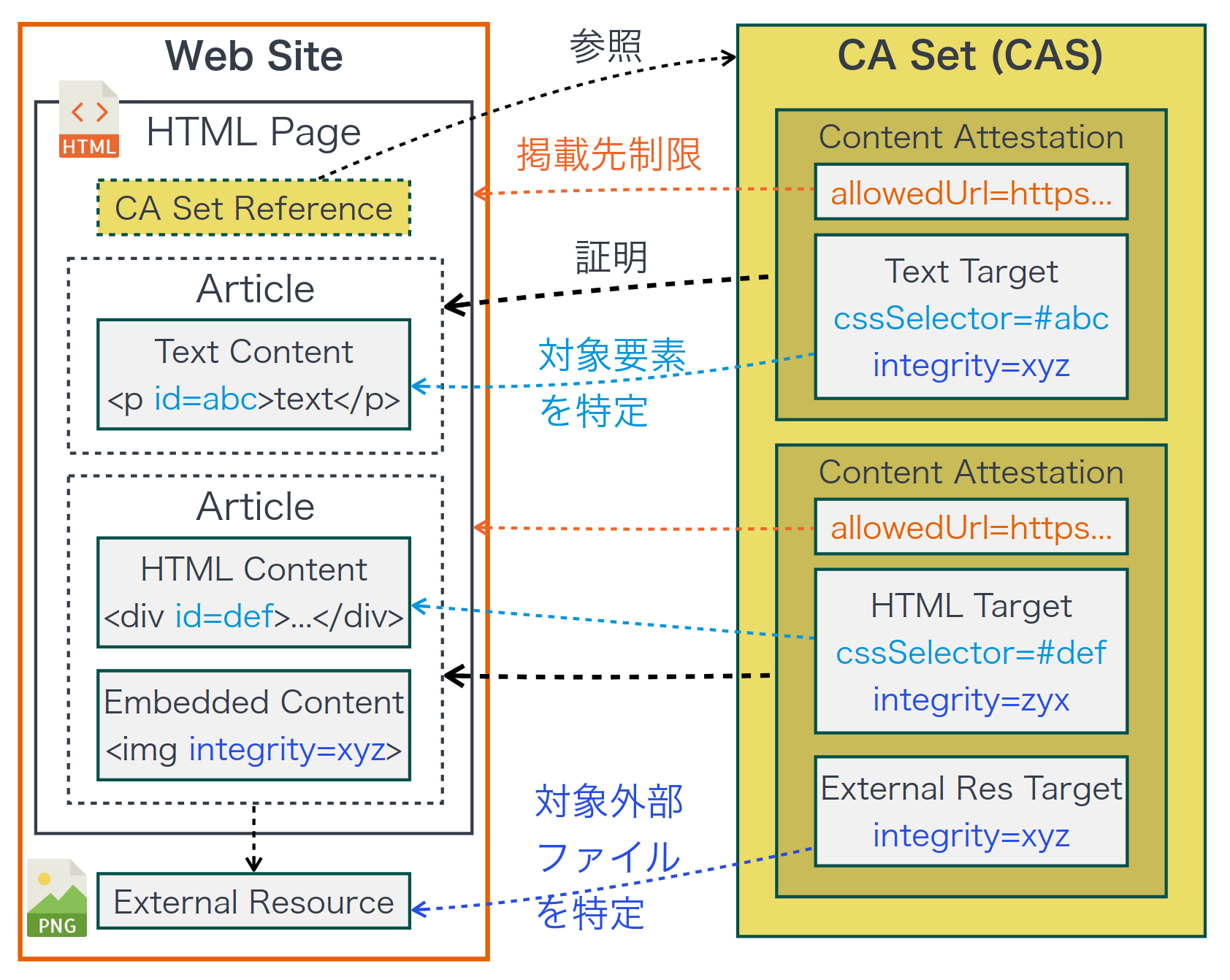
Content and HTML elements to be verified
We will explain the content and HTML elements to be verified using specific examples.
Content Attestation (CA) includes Content Integrity Descriptor (target property), which guarantees the integrity of the content it verifies.
Content Integrity Descriptor defines the following different types of targets (type property) based on Subresource Integrity (SRI):
- HTML Fragment Integrity (
HTMLTargetIntegrity): Part of an HTML document - Text within DOM Integrity (
TextTargetIntegrity): DOM text - Visible Text within DOM Integrity (
VisibleTextTargetIntegrity): Rendered Text - External Resource Integrity (
ExternalResourceTargetIntegrity): Internally or externally referenced media resources such asimg,audio, andvideoelements
A CA, or a set of CAs (CA Set), that combines these makes it possible to verify the integrity of the target content.
Specific examples
Example: https://originator-profile.org/en-US/chief-director/:
<script
  type="application/ca-set+json"
  src="/cas/en-US.chief-director.cas.json"
></script>
Specify that it is a CA Set by adding a script tag (<script type="application/ca-set+json">) in the HTML document (Linking).
Within the script tag, you can either write an array of CA (CAS) or reference CAS in the src attribute.
https://originator-profile.org/cas/en-US.chief-director.cas.json
[
  "eyJhbGciOiJFUzI1NiIsImtpZCI6IjBvQWJmZUdvMkE5N3RQYlNBWEVKMkRhLTNyLXNva1RHa3dFbnhKdm1la2siLCJ0eXAiOiJ2Yytqd3QiLCJjdHkiOiJ2YyJ9.eyJAY29udGV4dCI6WyJodHRwczovL3d3dy53My5vcmcvbnMvY3JlZGVudGlhbHMvdjIiLCJodHRwczovL29yaWdpbmF0b3ItcHJvZmlsZS5vcmcvbnMvY3JlZGVudGlhbHMvdjEiLCJodHRwczovL29yaWdpbmF0b3ItcHJvZmlsZS5vcmcvbnMvY2lwL3YxIix7IkBsYW5ndWFnZSI6ImVuIn1dLCJ0eXBlIjpbIlZlcmlmaWFibGVDcmVkZW50aWFsIiwiQ29udGVudEF0dGVzdGF0aW9uIl0sImlzc3VlciI6ImRuczp0ZWNoZGV2Lm9yaWdpbmF0b3ItcHJvZmlsZS5vcmciLCJjcmVkZW50aWFsU3ViamVjdCI6eyJ0eXBlIjoiQXJ0aWNsZSIsImhlYWRsaW5lIjoiTWVzc2FnZSBmcm9tIENoaWVmIERpcmVjdG9yIiwiaW1hZ2UiOnsiaWQiOiJodHRwczovL29yaWdpbmF0b3ItcHJvZmlsZS5vcmcvb2dwLWVuLnBuZyIsImRpZ2VzdFNSSSI6InNoYTI1Ni1rMlJNYVgwL3VpZFlrODV2TEMveGpGaHJsVjdiZnlsNEQ2VFIxUEZaWmE4PSJ9LCJkZXNjcmlwdGlvbiI6IlRoZSBOZXQgaGFzIGJyb3VnaHQgZ3JlYXQgYmVuZWZpdHMgdG8gdXMsIGJ1dCBpdCBoYXMgYWxzbyBjcmVhdGVkIG5ldyBwcm9ibGVtcyBzdWNoIGFzIHRoZSBzcHJlYWQgb2YgZmFrZSBuZXdzLiBXZSBhcmUgcHJvcG9zaW5nIE9QIGFzIGEgdGVjaCB0byBzb2x2ZSB0aGVzZSBwcm9ibGVtcy4iLCJhdXRob3IiOlsiT3JpZ2luYXRvciBQcm9maWxlIENvbGxhYm9yYXRpdmUgSW5ub3ZhdGlvbiBQYXJ0bmVyc2hpcCJdLCJlZGl0b3IiOlsiT3JpZ2luYXRvciBQcm9maWxlIENvbGxhYm9yYXRpdmUgSW5ub3ZhdGlvbiBQYXJ0bmVyc2hpcCJdLCJkYXRlUHVibGlzaGVkIjoiMjAyNC0wNy0yOVoiLCJkYXRlTW9kaWZpZWQiOiIyMDI0LTAzLTAzWiIsImdlbnJlIjoidGVjaG5vbG9neSIsImlkIjoidXJuOnV1aWQ6MTE3MTE3MGItYzZkNi00NGM2LWI2MWEtMjFjMzlkYTRjYmZlIn0sImFsbG93ZWRVcmwiOlsiaHR0cHM6Ly9vcmlnaW5hdG9yLXByb2ZpbGUub3JnL2VuLVVTL2NoaWVmLWRpcmVjdG9yKC8_KSIsImh0dHA6Ly9sb2NhbGhvc3Q6NDMyMS9lbi1VUy9jaGllZi1kaXJlY3RvcigvPykiXSwidGFyZ2V0IjpbeyJ0eXBlIjoiVGV4dFRhcmdldEludGVncml0eSIsImNzc1NlbGVjdG9yIjoiYXJ0aWNsZSBbaXRlbXByb3A9J2hlYWRsaW5lJ10sIGFydGljbGUgW2l0ZW1wcm9wPSdhcnRpY2xlQm9keSddIiwiaW50ZWdyaXR5Ijoic2hhMjU2LVFLeWFGdVI3UGpYaVRrOEVXRUliNWdnTmc5Q1dmYVE5Mm5UYTR6ZURUSFE9In0seyJ0eXBlIjoiRXh0ZXJuYWxSZXNvdXJjZVRhcmdldEludGVncml0eSIsImludGVncml0eSI6InNoYTI1Ni1jaWFYNXRPUE1oSmlHUG1Mai8rSnRKVWhDa0hzWE5MNDViZVB2M2czZ3VNPSJ9XSwiaXNzIjoiZG5zOnRlY2hkZXYub3JpZ2luYXRvci1wcm9maWxlLm9yZyIsInN1YiI6InVybjp1dWlkOjExNzExNzBiLWM2ZDYtNDRjNi1iNjFhLTIxYzM5ZGE0Y2JmZSIsImlhdCI6MTc4Mjg2Nzg1NSwiZXhwIjoxODE0NDAzODU1fQ.J1ieVWl9PIw9WfjXpfGiJtwzq_mwkT7Zev2jn-sF7faMf-lFAvmD6Ul_sxewcDvHIJGYEXqPazvjwNrGUCXYSg"
]
Specifically, CA is a string (JWT) that starts with "eyJ" as shown below.
eyJhbGciOiJFUzI1NiIsImtpZCI6IjBvQWJmZUdvMkE5N3RQYlNBWEVKMkRhLTNyLXNva1RHa3dFbnhKdm1la2siLCJ0eXAiOiJ2Yytqd3QiLCJjdHkiOiJ2YyJ9.eyJAY29udGV4dCI6WyJodHRwczovL3d3dy53My5vcmcvbnMvY3JlZGVudGlhbHMvdjIiLCJodHRwczovL29yaWdpbmF0b3ItcHJvZmlsZS5vcmcvbnMvY3JlZGVudGlhbHMvdjEiLCJodHRwczovL29yaWdpbmF0b3ItcHJvZmlsZS5vcmcvbnMvY2lwL3YxIix7IkBsYW5ndWFnZSI6ImVuIn1dLCJ0eXBlIjpbIlZlcmlmaWFibGVDcmVkZW50aWFsIiwiQ29udGVudEF0dGVzdGF0aW9uIl0sImlzc3VlciI6ImRuczp0ZWNoZGV2Lm9yaWdpbmF0b3ItcHJvZmlsZS5vcmciLCJjcmVkZW50aWFsU3ViamVjdCI6eyJ0eXBlIjoiQXJ0aWNsZSIsImhlYWRsaW5lIjoiTWVzc2FnZSBmcm9tIENoaWVmIERpcmVjdG9yIiwiaW1hZ2UiOnsiaWQiOiJodHRwczovL29yaWdpbmF0b3ItcHJvZmlsZS5vcmcvb2dwLWVuLnBuZyIsImRpZ2VzdFNSSSI6InNoYTI1Ni1rMlJNYVgwL3VpZFlrODV2TEMveGpGaHJsVjdiZnlsNEQ2VFIxUEZaWmE4PSJ9LCJkZXNjcmlwdGlvbiI6IlRoZSBOZXQgaGFzIGJyb3VnaHQgZ3JlYXQgYmVuZWZpdHMgdG8gdXMsIGJ1dCBpdCBoYXMgYWxzbyBjcmVhdGVkIG5ldyBwcm9ibGVtcyBzdWNoIGFzIHRoZSBzcHJlYWQgb2YgZmFrZSBuZXdzLiBXZSBhcmUgcHJvcG9zaW5nIE9QIGFzIGEgdGVjaCB0byBzb2x2ZSB0aGVzZSBwcm9ibGVtcy4iLCJhdXRob3IiOlsiT3JpZ2luYXRvciBQcm9maWxlIENvbGxhYm9yYXRpdmUgSW5ub3ZhdGlvbiBQYXJ0bmVyc2hpcCJdLCJlZGl0b3IiOlsiT3JpZ2luYXRvciBQcm9maWxlIENvbGxhYm9yYXRpdmUgSW5ub3ZhdGlvbiBQYXJ0bmVyc2hpcCJdLCJkYXRlUHVibGlzaGVkIjoiMjAyNC0wNy0yOVoiLCJkYXRlTW9kaWZpZWQiOiIyMDI0LTAzLTAzWiIsImdlbnJlIjoidGVjaG5vbG9neSIsImlkIjoidXJuOnV1aWQ6MTE3MTE3MGItYzZkNi00NGM2LWI2MWEtMjFjMzlkYTRjYmZlIn0sImFsbG93ZWRVcmwiOlsiaHR0cHM6Ly9vcmlnaW5hdG9yLXByb2ZpbGUub3JnL2VuLVVTL2NoaWVmLWRpcmVjdG9yKC8_KSIsImh0dHA6Ly9sb2NhbGhvc3Q6NDMyMS9lbi1VUy9jaGllZi1kaXJlY3RvcigvPykiXSwidGFyZ2V0IjpbeyJ0eXBlIjoiVGV4dFRhcmdldEludGVncml0eSIsImNzc1NlbGVjdG9yIjoiYXJ0aWNsZSBbaXRlbXByb3A9J2hlYWRsaW5lJ10sIGFydGljbGUgW2l0ZW1wcm9wPSdhcnRpY2xlQm9keSddIiwiaW50ZWdyaXR5Ijoic2hhMjU2LVFLeWFGdVI3UGpYaVRrOEVXRUliNWdnTmc5Q1dmYVE5Mm5UYTR6ZURUSFE9In0seyJ0eXBlIjoiRXh0ZXJuYWxSZXNvdXJjZVRhcmdldEludGVncml0eSIsImludGVncml0eSI6InNoYTI1Ni1jaWFYNXRPUE1oSmlHUG1Mai8rSnRKVWhDa0hzWE5MNDViZVB2M2czZ3VNPSJ9XSwiaXNzIjoiZG5zOnRlY2hkZXYub3JpZ2luYXRvci1wcm9maWxlLm9yZyIsInN1YiI6InVybjp1dWlkOjExNzExNzBiLWM2ZDYtNDRjNi1iNjFhLTIxYzM5ZGE0Y2JmZSIsImlhdCI6MTc4Mjg2Nzg1NSwiZXhwIjoxODE0NDAzODU1fQ.J1ieVWl9PIw9WfjXpfGiJtwzq_mwkT7Zev2jn-sF7faMf-lFAvmD6Ul_sxewcDvHIJGYEXqPazvjwNrGUCXYSg
JWT can be converted to JSON by decoding it.

{
  "@context": [
    "https://www.w3.org/ns/credentials/v2",
    "https://originator-profile.org/ns/credentials/v1",
    "https://originator-profile.org/ns/cip/v1",
    {
      "@language": "en"
    }
  ],
  "type": ["VerifiableCredential", "ContentAttestation"],
  "issuer": "dns:techdev.originator-profile.org",
  "credentialSubject": {
    "type": "Article",
    "headline": "Message from Chief Director",
    "image": {
      "id": "https://originator-profile.org/ogp-en.png",
      "digestSRI": "sha256-k2RMaX0/uidYk85vLC/xjFhrlV7bfyl4D6TR1PFZZa8="
    },
    "description": "The Net has brought great benefits to us, but it has also created new problems such as the spread of fake news. We are proposing OP as a tech to solve these problems.",
    "author": ["Originator Profile Collaborative Innovation Partnership"],
    "editor": ["Originator Profile Collaborative Innovation Partnership"],
    "datePublished": "2024-07-29Z",
    "dateModified": "2024-03-03Z",
    "genre": "technology",
    "id": "urn:uuid:1171170b-c6d6-44c6-b61a-21c39da4cbfe"
  },
  "allowedUrl": [
    "https://originator-profile.org/en-US/chief-director(/?)",
    "http://localhost:4321/en-US/chief-director(/?)"
  ],
  "target": [
    {
      "type": "TextTargetIntegrity",
      "cssSelector": "article [itemprop='headline'], article [itemprop='articleBody']",
      "integrity": "sha256-QKyaFuR7PjXiTk8EWEIb5ggNg9CWfaQ92nTa4zeDTHQ="
    },
    {
      "type": "ExternalResourceTargetIntegrity",
      "integrity": "sha256-ciaX5tOPMhJiGPmLj/+JtJUhCkHsXNL45bePv3g3guM="
    }
  ],
  "iss": "dns:techdev.originator-profile.org",
  "sub": "urn:uuid:1171170b-c6d6-44c6-b61a-21c39da4cbfe",
  "iat": 1782867855,
  "exp": 1814403855
}
Typical properties:
credentialSubject: In the concept of Verifiable Credentials (VC), the property that indicates the subject to which a certificate (credential) is addressed.headline: Content titledescription: Content Description
allowedUrl: URL Patterntest(input, baseURL)Algorithm-specific allowed rangetarget: Content Integrity Descriptor (Array)typeHTMLTargetIntegrity: Part of an HTML documentTextTargetIntegrity: DOM textVisibleTextTargetIntegrity: Rendered textExternalResourceTargetIntegrity: Internally or externally referenced media resources such asimg,audio, andvideoelements
Display example:
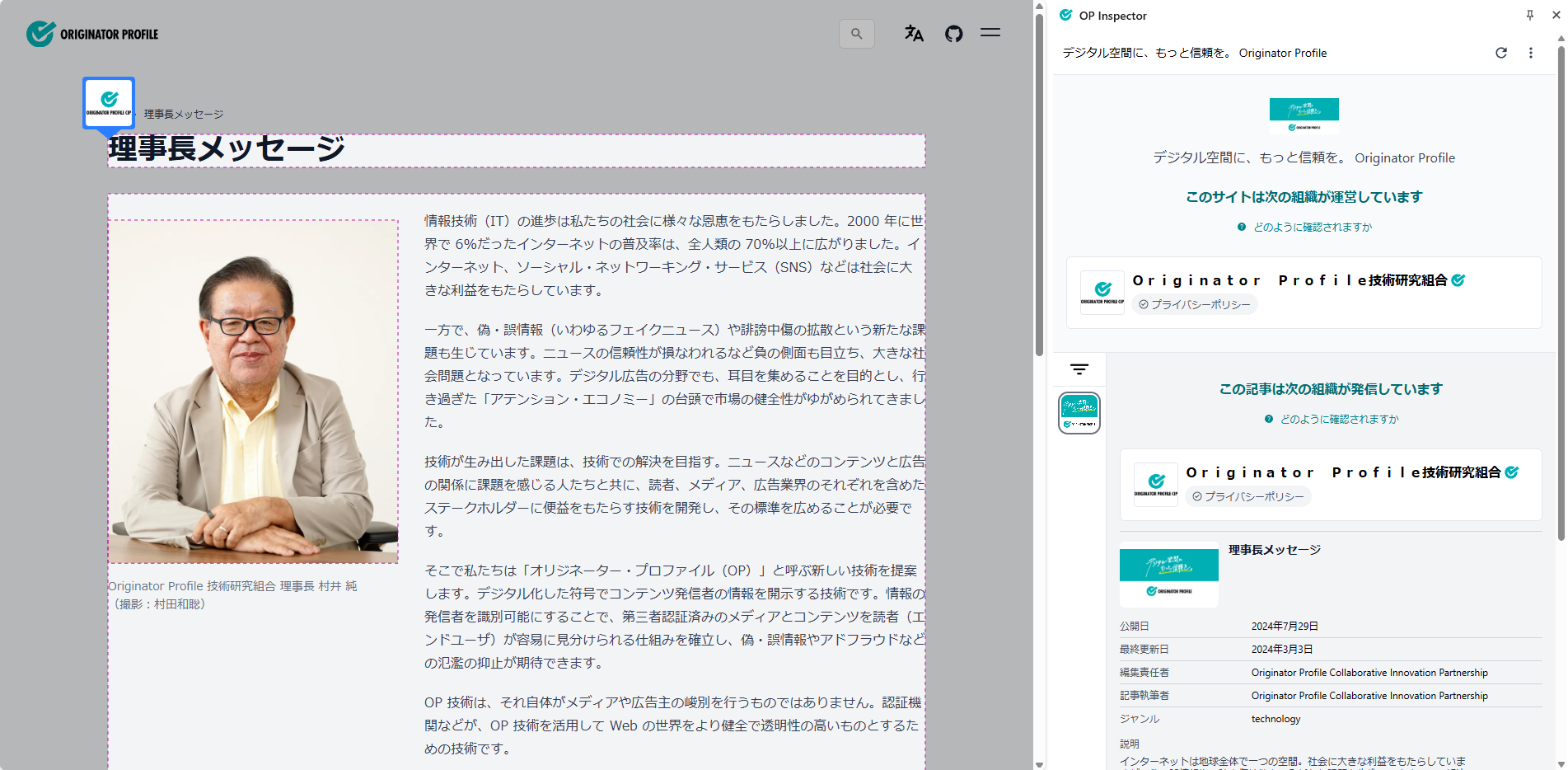
For articles (static HTML elements containing content to display)
Recommended Content Integrity Descriptor:
HTMLTargetIntegrityTextTargetIntegrity… Default type of WordPress plugin (CA Manager)VisibleTextTargetIntegrity
Specify a CSS selector (the cssSelector property) that targets the article body.
When doing this, you should avoid elements that are dynamically rewritten depending on the timing of access, user, or environment (e.g., advertisements or timestamps), as it is difficult to guarantee their integrity.
About CSS selectors
Selecting elements with CSS selectors is the same as the document.querySelectorAll() algorithm used by browsers.
In any Content Integrity Descriptor, if there are two or more elements that match the selector, they are all combined and the integrity (integrity property) is calculated.
About "Integrity"
Use the integrity property to check the integrity of the UTF-8 byte sequence of the concatenated text.
Specific examples:
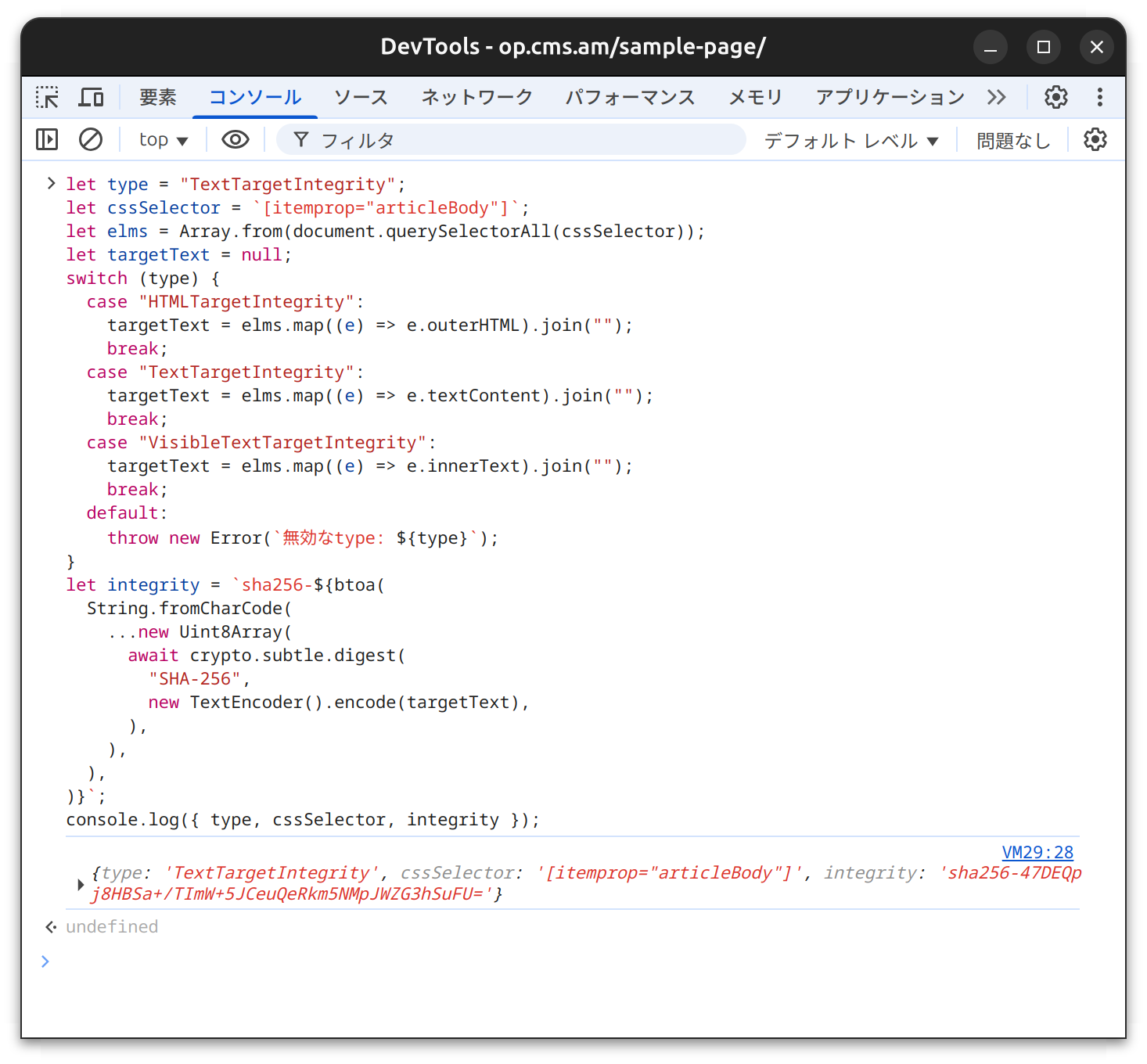
sha256-47DEQpj8HBSa+/TImW+5JCeuQeRkm5NMpJWZG3hSuFU=
You can check the hash value of the UTF-8 byte sequence of the target HTML or text by using the console in the developer tools.
Launching Developer Tools
- Right-click > Select [Inspect]
- [More tools] > Select [Developer tools]
- For Windows/Linux:
Ctrl+Shift+I - For macOS:
⌘ (Command)+⌥ (Option)+I
Enter the following code into the console:
// Caution: This is development code, please run it only if you understand the potential risks.

// The type of content to be verified (Example: TextTargetIntegrity)
let type = "TextTargetIntegrity";

// CSS selector of the content to verify
let cssSelector = `[itemprop="articleBody"]`;

let elms = Array.from(document.querySelectorAll(cssSelector));
let targetText = null;
switch (type) {
  case "HTMLTargetIntegrity":
    targetText = elms.map((e) => e.outerHTML).join("");
    break;
  case "TextTargetIntegrity":
    targetText = elms.map((e) => e.textContent).join("");
    break;
  case "VisibleTextTargetIntegrity":
    targetText = elms.map((e) => e.innerText).join("");
    break;
  default:
    throw new Error(`Invalid type: ${type}`);
}
let integrity = `sha256-${btoa(
  String.fromCharCode(
    ...new Uint8Array(
      await crypto.subtle.digest(
        "SHA-256",
        new TextEncoder().encode(targetText),
      ),
    ),
  ),
)}`;
console.log({ type, cssSelector, integrity });
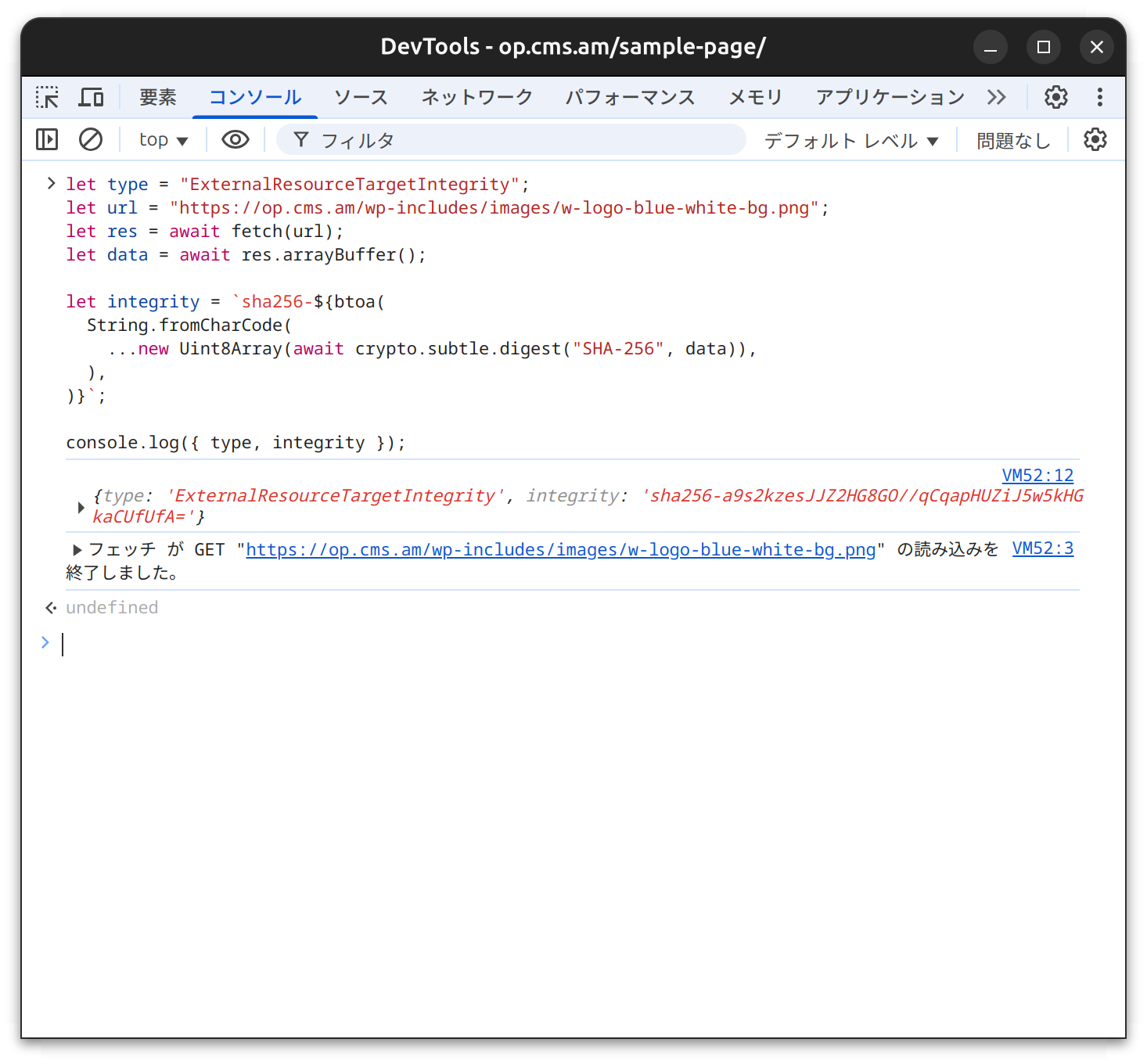
Execution example:
For images (static img elements with no interaction)
Recommended Content Integrity Descriptor:
ExternalResourceTargetIntegrity
For img elements, the integrity of the image media resource specified by the integrity and src attributes is checked.
Media resources that are dynamically rewritten depending on the timing of access or the user or environment should be avoided, as it is difficult to guarantee their integrity.
About "Integrity"
Use the integrity property to check integrity.
In the case of ExternalResourceTargetIntegrity, the target is the byte sequence of the media resource.
You can check the hash value of the byte sequence of the target media resource by using the developer tools console.
Enter the following code into the console:
// Caution: This is development code, please run it only if you understand the potential risks.

// The type of content to be verified
let type = "ExternalResourceTargetIntegrity";

// The URL of the target media resource
let url = "https://op.cms.am/wp-includes/images/w-logo-blue-white-bg.png";

let res = await fetch(url);
let data = await res.arrayBuffer();

let integrity = `sha256-${btoa(
  String.fromCharCode(
    ...new Uint8Array(await crypto.subtle.digest("SHA-256", data)),
  ),
)}`;

console.log({ type, integrity });
Execution example: